
How can I search and download data?
To explore and search for a dataset you can go to the explore tab, located at the upper left bar or access it from the home clicking in Explore Dataset. You can filter by main category, for example prices, activity or financial and when selecting each of them, a list of referred datasets is displayed.

In addition, you can explore the most recent or most popular datasets simply by clicking "see more" in the corresponding column. Also, below you can find a list of recommended datasets for you, to facilitate your search.

In the left column there are different filters such as country, frequency or source, which will be of great help to simplify the search.

When searching for a specific dataset utilize the bar on the upper right corner. Use keywords in order to find the data you are looking for. Then, navigate to see the dataset details and find the repository that stores it.

You can build lists of favorite datasets to rapidly acces. You can go to the view of the dataset you want and press the Follow option, located under the publisher. To remove it from the list, simply select Unfollow. Another way, is in the dataset listings, when browsing categories and tags, you will see the Follow button on the right, next to the update information. Your selected datasets will then appear on your home page, in the followed datasets section
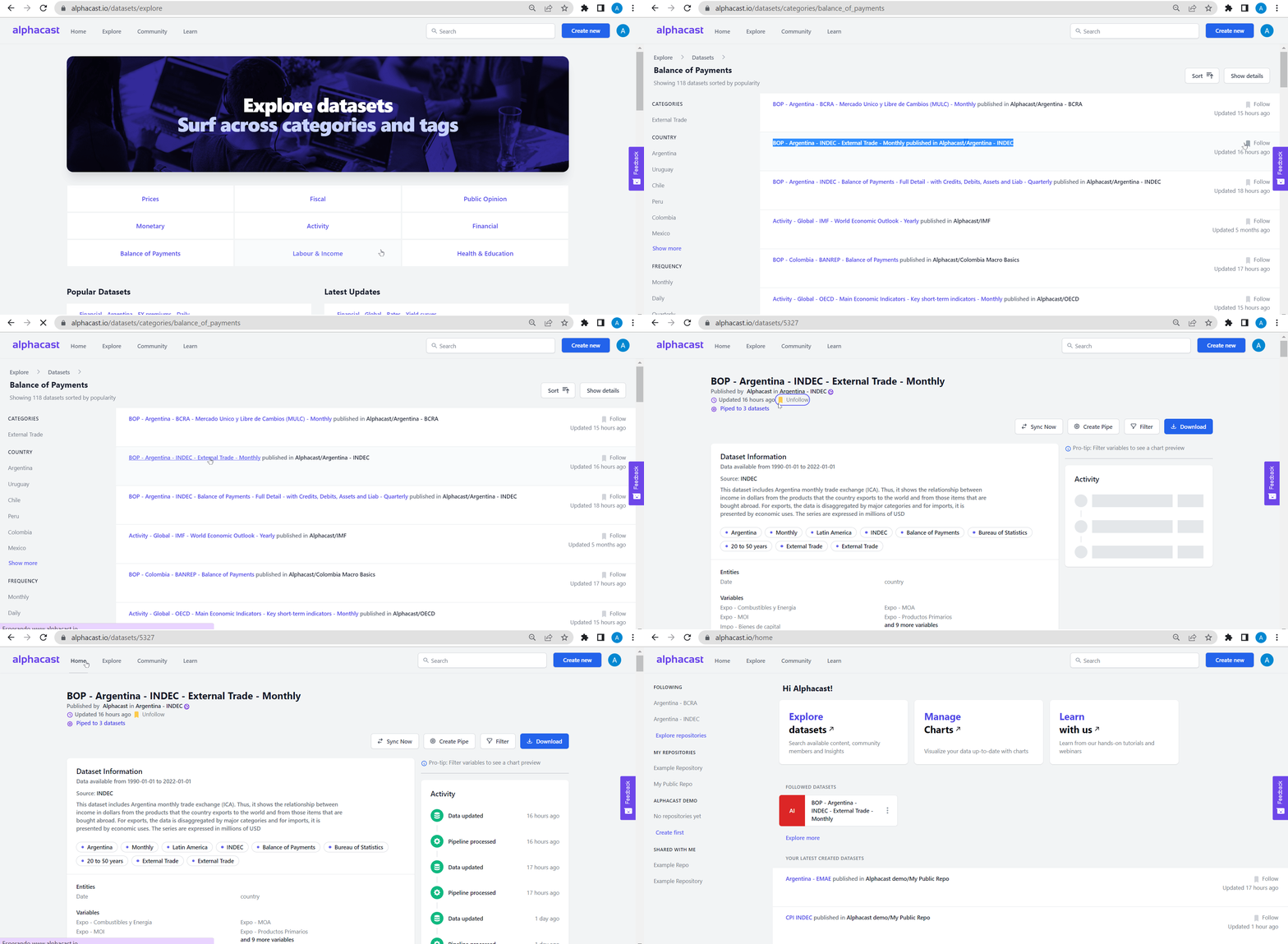
In the dataset view you can explore and download data. Once you decide what data you need, you can download it by clicking the Download on the dataset menu. You can choose between different formats for download., such as CSV or XLSX, for example.

Another way of finding the datasets you want is by clicking on a repository. There is a tab that includes all the datasets related to that specific topic. Select any repository of your interest and click on the tab called "Datasets". Choose the dataset you want from the list. When clicking on its name, it will redirect you to dataset view.

Related insights
How to integrate Alphacast with Excel and Google Sheets?
Excel and Google Sheets allow adding data from different sources. Here you can find an alternative way to embed data into Excel, by using our TSV data source:
Step 1. Getting the download link
From a Dataset
First of all, filter the information you want to use. Excel
Alphatour: Navigating Global Financial Data with Alphacast
Prepare for our worldwide data availability!
Check out all Global Datasets here.
Alphacast has become a crucial tool for those seeking up-to-date and high-quality information on global economy, market fluctuations and financial trends, as it provides easy and fast access to a wide variety of large-scale data sources, allowing for
A short guide to US Inflation data
Highlights of the Dynamic of US Inflation
The United States has been struggling with a significant inflationary acceleration since the serie of international events, including the outbreak of the COVID-19, war between Ukraine and Russia, the global rise in energy prices, and the collapse of Silicon Valley Bank, among others. All
A short guide to Ecuadorian macro and financial data
Interested in activity, prices, monetary, fiscal, external sector, and financial data for Ecuador? There are loads of datasets, available in both the Central Bank of Ecuador (BCE) and **National Institute of Statistics (
A short guide to Chilean macro data
Interested in activity, prices, monetary, fiscal, external sector, and financial data for Chile? There are loads of datasets, see for example this Repository which has official statistics from INEI and BCRP. However, this short guide will help you find the our "must-see" datasets.
Chile Country Profile Dashboard
The starting point is